Payment to Reconciliation in a Single Workflow: How haeywa Works
At haeywa, we built our platform around one simple idea: a business payment shouldn't need five tools to go from "approved" to "closed in the books". Yet that's how most finance teams still work. Cards sit with one provider, approvals happen on email, bills live in a shared folder and reconciliation happens in a spreadsheet at month-end. This guide explains how haeywa's payment to reconciliation in a single workflow replaces that patchwork, and what automated expense management software really looks like from start to finish.
What Does "Payment to Reconciliation in a Single Workflow" Mean?
It means every step of a business spend happens on one platform: funding the budget, controlling and approving the spend, capturing the bill, matching it against the payment and reporting it. Each transaction is documented as it happens and linked to its supporting bill, so finance never has to piece the story together later. If you're new to the bigger picture, our guide on what spend management is explains why this matters for growing businesses.
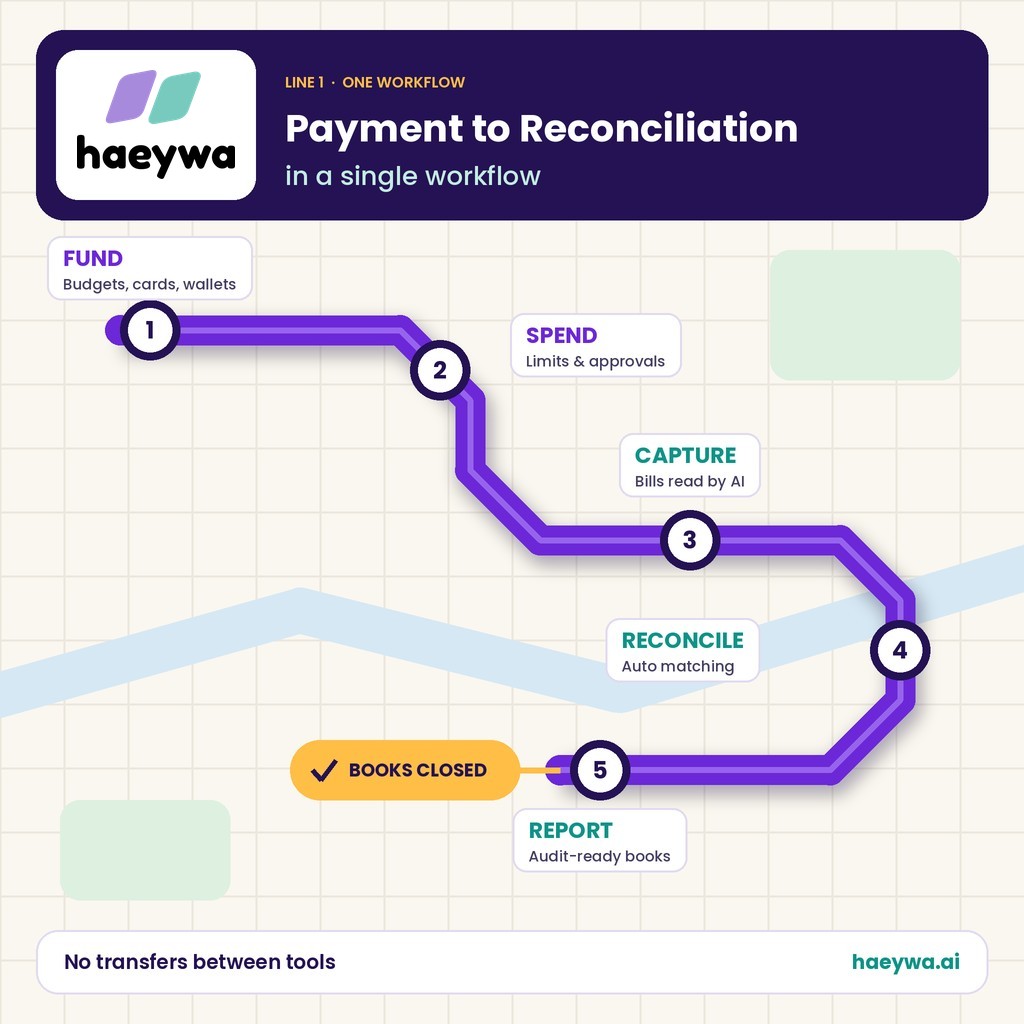
In practice, haeywa works as an automated expense management system with five connected steps: Fund, Spend, Capture, Reconcile and Report. The final step flows straight into your books through integration with your accounting software, so data is entered once and used everywhere.
The Problem With Disconnected Finance Tools
When payments, approvals and accounting live in separate places, the same expense is handled again and again:
- Double entry: amounts are typed into a claim form, a spreadsheet and then the accounting system.
- Missing bills: card spends arrive without receipts, and finance spends days chasing them.
- Slow approvals: claims wait in inboxes with no clear owner or deadline.
- Late visibility: finance sees spending only at month-end, when it's too late to control it.
- Painful reconciliation: matching bank lines to bills becomes a manual, error-prone job.
The real cost isn't any single tool; it's the gaps between them. An expense automation system closes those gaps by keeping every step on one record.
How haeywa Works: 5 Steps From Payment to Reconciliation
haeywa connects five steps on one platform, so every spend moves from funding to the books without changing tools.
Step 1: Fund — Budgets, Cards, Wallets
Control starts before any money is spent. In haeywa, finance sets budgets and puts funds where teams need them:
- Budgets: set by employee, team, department or project.
- Corporate prepaid cards: physical and virtual prepaid cards on the RuPay network, loaded from the company account.
- Digital petty cash wallets: a digital float for branches, sites and field teams instead of a cash box.
Because teams spend company money directly, employees aren't left out of pocket, and fewer spends turn into reimbursement claims.
Step 2: Spend — Controls and Approvals
Once funds are in place, rules decide how they can be used. This is where you automate expense management instead of policing it by hand:
- Spending limits: per transaction, per day or per month.
- Merchant and category controls: cards work only for the types of spend they're meant for.
- Multi-level approvals: spends and claims route to the right manager or finance reviewer based on amount and policy.
- Freeze or block: stop a card instantly if it's lost or no longer needed.
Approvers act from their phone, and every decision is recorded against the transaction it belongs to.
Step 3: Capture — Receipts and Data
Every spend needs proof, and that's usually where workflows break. With haeywa's expense automation app, employees snap a photo of the bill right after paying, on Android or iOS.
- AI reads the bill: AI-powered OCR extracts the vendor, date and amount, so nobody types them in.
- Linked automatically: the bill attaches to the matching card transaction or claim.
- Errors flagged early: AI checks bill details and flags discrepancies, such as amount mismatches.
- Location recorded: location-based analytics show where each spend happened.
Step 4: Reconcile — Automatic Matching
In a disconnected setup, reconciliation is a month-end project. In an automated expenses system, it happens as you go. haeywa matches payments against bank entries and bills automatically, so each transaction already carries its proof, approval and category.
Finance only reviews the exceptions: a missing bill, a mismatch or a spend outside policy. Categories, departments, cost centres and GL codes are applied along the way, so each entry lands in the right ledger. One customer describes how month-end used to mean sorting paper receipts and typing entries into Tally, and how haeywa now syncs it all automatically.
Step 5: Report — Audit-Ready Records
Because every step happened on one platform, the record is complete by the time it reaches a report:
- Real-time dashboards: spending by person, team, category and location.
- Full audit trail: who spent, who approved, when, and the bill behind it, ready for audit and compliance reporting.
- Accounting sync: expenses, invoices, payments and reimbursements flow into your accounting software through APIs.
What This Means for Your Finance Team
Moving from scattered tools to one workflow changes the finance team's job from data entry to decision-making:
- Faster month-end close: most transactions are already matched before the month ends.
- Less manual work: no re-keying amounts or chasing bills.
- Better control: limits apply before money is spent, not after.
- Happier employees: no paying from their own pocket and waiting to be repaid.
- Cleaner audits: every number traces back to a bill and an approval.
Still chasing approvals on email and bills on WhatsApp? Book a free demo and see how haeywa connects every spend, approval and bill in one workflow.
Why Choose haeywa as Your Business Spend Management Software
Many tools cover one piece of the puzzle: a card, a wallet or a claims app. haeywa is business spend management software that covers the whole journey, from the first rupee loaded to the final entry in your books.
- One platform: expenses, petty cash, reimbursements, prepaid cards, vendor payouts and bill payments together.
- AI built in: bills read automatically and discrepancies flagged before they become problems.
- Built for Indian businesses: RuPay cards and accounting sync, including Tally.
- Web and mobile: a dashboard for finance and an app for employees on the move.
- Onboarding support: product training and dedicated customer support from the haeywa team.
Conclusion
Payment to reconciliation in a single workflow means one record for every spend, from funding and approval to bill capture, automatic matching and reporting. Instead of stitching together cards, spreadsheets and email, finance teams get control before money is spent and clean books after. With automated expense management software like haeywa, every step of that journey happens in one place.
Also Check
- A Finance Manager's Guide to Cutting Reconciliation Time in Half
- How AI Is Transforming Corporate Expense Management
Frequently Asked Questions
What is payment to reconciliation?
It's the full journey of a business spend: funding, paying, approving, capturing the bill, matching it against the payment and recording it in the books.
Why does a single workflow matter?
Every step shares one record, so there's no double entry, no missing bills and no month-end scramble to match payments with receipts.
Does haeywa integrate with accounting software?
Yes. haeywa, one of the best automated expense management software options for Indian businesses, syncs expenses, invoices, payments and reimbursements with your accounting software through APIs, including Tally.
How long does setup take?
It depends on your teams and policies. Prepaid cards can be issued in minutes, and the haeywa team helps with onboarding and training. A 15-minute demo is a good first step.
From Payment to Reconciliation, in One Place
Book a free demo and see how haeywa funds, controls, captures, reconciles and reports every business spend in a single workflow.
Learn more →