
Expense Approval Workflow: How to Set One Up That Doesn’t Slow Your Team Down
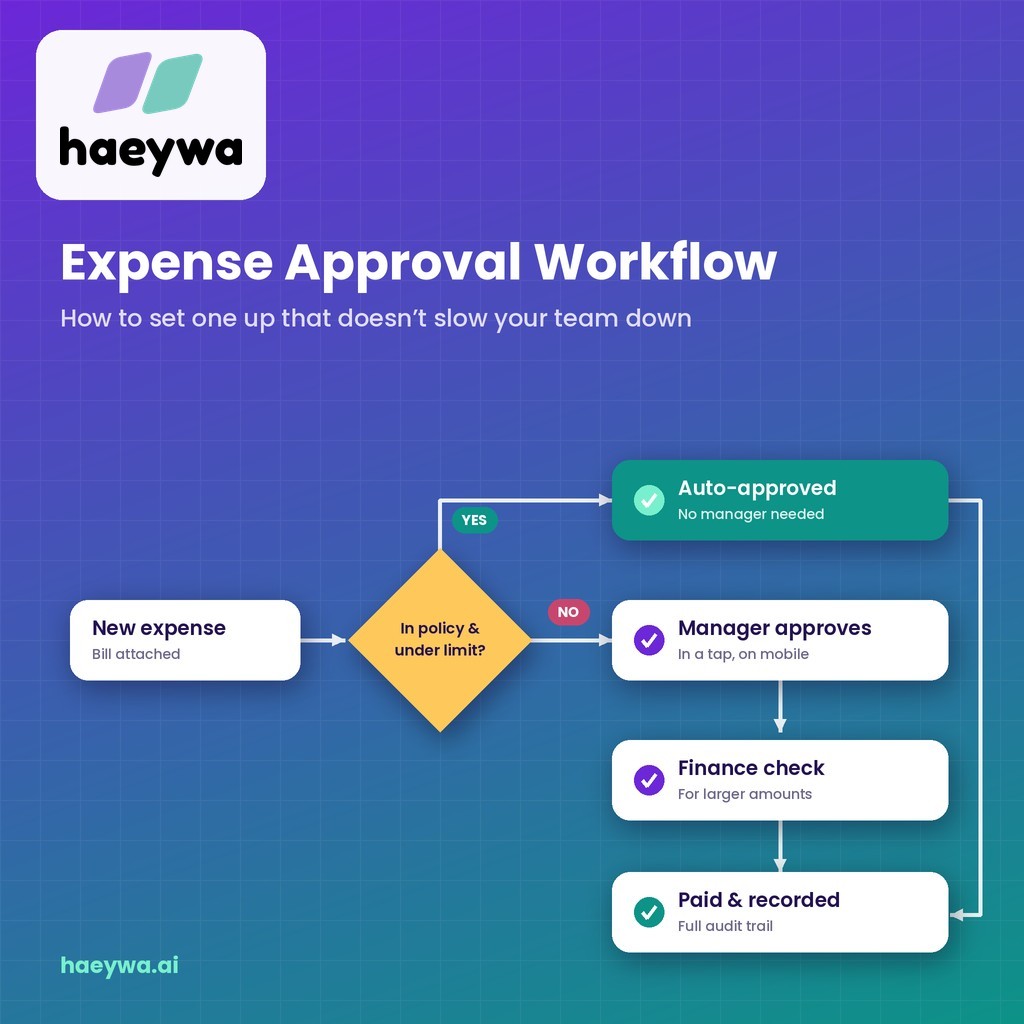
At haeywa, we often hear two complaints about expense approvals, usually from the same company. Finance says approvals are too loose and money slips through. Employees say approvals are too slow and their claims sit in a manager's inbox for weeks. Both are symptoms of the same problem: an approval process that grew by accident instead of by design. This guide shows how to set up an expense approval workflow for reimbursements and petty cash that keeps control without slowing your team down.
What Is an Expense Approval Workflow?
An expense approval workflow is the set of rules that decides who must approve a business expense, in what order and within what time, before it is paid or reimbursed. It turns your expense policy into a repeatable process, so every claim follows the same path.
A good workflow answers four questions for every spend: Does it need approval? Who approves it? What happens if they don't respond? And how is the decision recorded? It is also one of the simplest ways to monitor employee expenses without micromanaging, because the rules do the routine checks for you.
When those answers are written down and built into an expense approval system, approvals become fast and predictable. When they live in people's heads, approvals become slow and inconsistent.
Common Approval Models
Most businesses use one of these models, or a mix of them.
- Single approval: one person, usually the direct manager, approves every expense. Simple, but it can overload busy managers.
- Multi-level approval: an expense passes through two or more approvers, for example the manager, then finance. Stronger control for larger amounts.
- Amount-based approval: the approval path depends on the amount. Small spends need one approver; large ones need more.
- Category-based approval: the path depends on the type of spend. Travel goes to the travel owner, IT purchases to the IT head, marketing spends to the marketing lead.
For most growing businesses, a mix of amount-based and multi-level approval works best: light approval for small spends, more checks as the amount rises. Most expense report management solutions let you combine these models in one set of rules.
Designing Approval Rules: A Step-by-Step Guide
- List your expense types. Travel, meals, local conveyance, office supplies, client costs, petty cash and so on.
- Set amount bands. For example: under ₹2,000, ₹2,000 to ₹25,000 and above ₹25,000. Choose bands that match how your business spends.
- Assign approvers to each band. Auto-approval or the manager for small spends; manager plus finance for medium spends; a department head or founder for large ones.
- Add category exceptions. Some spends, such as software or travel, may need a specific owner whatever the amount.
- Set response times. For example, 24 hours per approval level, with a reminder and then escalation if no one responds.
- Name backup approvers. So claims keep moving when someone is on leave.
- Write it down and share it. Employees should know exactly what will happen to their claim.
How to Avoid Approval Bottlenecks
The biggest risk with approvals isn't fraud, it's delay. These habits keep claims moving:
- Auto-approve small, in-policy spends. If a bill is attached and the spend is within limits, there's little for a manager to add.
- Keep levels to a minimum. Every extra approver adds days. Two levels are enough for most expenses.
- Use escalation, not chasing. If an approver doesn't respond in time, the claim moves to their backup automatically.
- Batch nothing. Approving claims as they arrive is faster than a weekly pile.
- Fix policy gaps. If the same question comes up again and again, write the answer into the rules.
Are claims waiting days in a manager's inbox? Book a free demo and see how haeywa routes every expense to the right approver automatically.
Approvals and Audit Trails
Every approval decision is also a record. When an auditor or your finance team looks back at an expense, they should be able to see who submitted it, who approved it, when and on what basis.
Good expense reporting systems keep this history automatically: the bill, the claim, each approval or rejection with a timestamp, and the final payment. That record protects approvers too, because it shows they followed the rules. haeywa stores all of this together for audit and compliance reporting, so there's nothing to piece together at year-end.
Mobile Approvals in Practice
Managers are rarely at their desks when claims arrive. Most modern expense reporting solutions include an expense approval app that lets them decide in seconds, wherever they are.
- See everything on one screen: amount, category, bill photo, policy check and the employee's note.
- Approve, reject or ask a question: with a tap, and a short comment if needed.
- Get timely reminders: a nudge before the response time runs out, not a pile of emails.
Mobile approvals are often the single biggest change in claim turnaround time, especially for field and sales managers who travel themselves.
How haeywa's Multi-Level Approvals Work
Standalone expense approval software or expense report processing software only handles the sign-off. haeywa builds your approval workflow into the same platform where your team spends, so approvals happen as part of the flow, not as an extra step.
- Rule-based routing: expenses go to the right approver based on amount, team and category.
- Multi-level approvals: add a finance check or a senior approver for larger spends.
- Policy checks before approval: spends outside limits are flagged, so approvers focus on exceptions.
- Bills attached automatically: AI-powered OCR reads every bill, so approvers see the details instantly.
- Approvals on the go: managers approve from their phone in a tap.
- Complete audit trail: every decision is recorded with the bill and payment.
Approved claims then move straight to payment and reconciliation, all in a single workflow.
Conclusion
An expense approval workflow should protect company money without making employees wait. Choose an approval model that fits your size, set clear amount bands and approvers, auto-approve the small stuff, use escalation instead of chasing and keep every decision on record. With an expense approval system like haeywa doing the routing, approvals become fast, fair and audit-ready.
Also Check
- What Is Spend Management? A Complete Guide for Growing Businesses
- How to Track Expenses on a Business Trip: A Guide for Employees
Frequently Asked Questions
How many approval levels should expenses have?
Usually one or two. Small, in-policy spends can be auto-approved or need just the manager; larger spends can add a finance check. More levels mainly add delay.
Who should approve employee expenses?
Typically the employee's direct manager, with finance reviewing larger or unusual spends. Specific categories, such as travel or software, can go to a named owner.
Can small expenses be auto-approved?
Yes. Many businesses auto-approve spends below a set amount when a bill is attached and the spend is within policy, then review them in monthly reports.
What is an expense approval system?
It's software that routes expenses to the right approvers using set rules, records each decision and passes approved claims to payment. haeywa does this with multi-level, rule-based approvals.
Approvals in a Tap, Not a Week
Book a free demo and see how haeywa routes every expense to the right approver, with rules, limits and a complete audit trail.
Learn more →